React Pixel
A browser-based pixel-art editor built around a simple grid, with drawing tools, reversible brush strokes, and an experiment in drawing together.
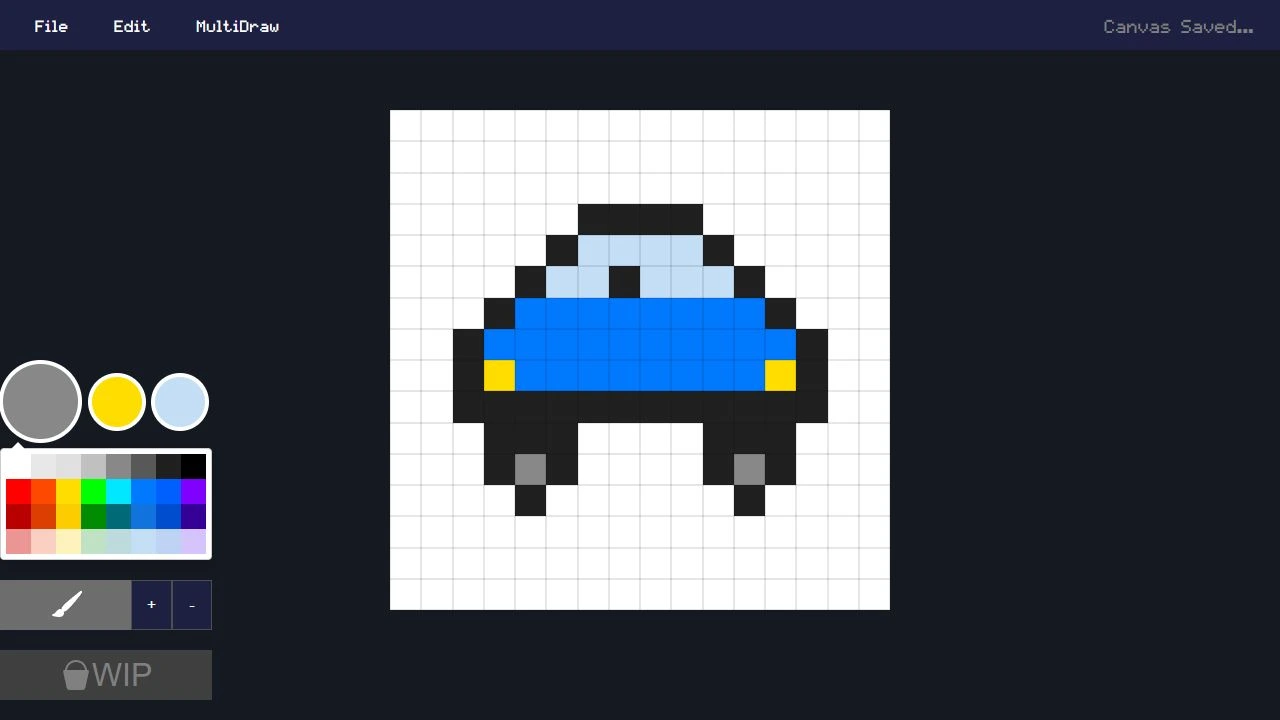
Building the drawing tools myself
I started React Pixel in 2021 to build a drawing application from the underlying interactions up. The canvas is a grid of HTML elements, with each cell identified by its row and column. React manages the editor controls and grid structure, while the brush updates individual cells as the pointer moves.
The editor starts with a choice of 16, 32, or 64 pixels per side. It includes a color palette, three brush sizes, optional gridlines, and wheel-controlled zoom. Larger brushes find neighboring cells around the pointer, checking the edges so a stroke stays inside the drawing area.
Technical details
- Interface
- React 17, functional components, hooks, and SCSS
- Drawing
- DOM pixel grid, pointer tracking, and coordinate-based brushes
- History
- Before-and-after cell colors stored per stroke in sessionStorage
- Persistence
- Canvas colors saved to localStorage, with dimension checks on load
- Export
- SVG download through html-to-image
- Collaboration
- Experimental MultiDraw rooms using LioWebRTC data channels
- Hosting
- Static React build on GitHub Pages
Making a stroke reversible
A brush stroke records each affected cell's coordinates, its original color, and its new color. Releasing the mouse stores that group as one history entry. Undo restores the original colors; redo applies the new ones. The same compact representation can replay a stroke without storing an entire image for every change.
Saving a drawing walks the grid and serializes its colors into browser storage. Loading checks that the saved cell count matches the current canvas dimensions. Export uses the rendered grid to produce a downloadable SVG.
Reusing strokes for MultiDraw
I also built an experimental shared drawing mode. LioWebRTC connects peers in a named room and sends completed strokes over data channels. The receiving editor reuses the redo function to apply the incoming cells. Undo, redo, and resizing are disabled while connected, keeping those local operations from conflicting with the shared drawing.
This is an early project with visible limits: the fill bucket is marked as work in progress, and the grid size is capped to keep zooming manageable. It captures my interest in interactive tools and the mechanics behind editing, history, persistence, and collaboration.
Explore the project
The start date comes from the project's first commit.